CLI Subcommands
CLI Subcommands
version
Prints the binary version, Go version, and platform:
validate
Validates a configuration file without starting the server. Exits 0 on success with a brief summary, or exits 1 with error details. Useful for CI pipelines or pre-deploy checks:
admin
Operational CLI for inspecting and controlling a running instance. Resolves the server address and admin token with the precedence flag → environment → config file, loading config.yaml only when a value is still missing. This lets a local binary target a remote instance with just env vars and no server config:
Flags:
| Flag | Default | Description |
|---|---|---|
-config | config.yaml | Path to config file; loaded only when -addr/-token (or their env vars) are unset |
-addr | $S3O_ADMIN_ADDR, else config server.listen_addr | Server address |
-token | $S3O_ADMIN_TOKEN, else config ui.admin_token / ui.admin_key | Admin API token |
-json | off | Emit raw JSON instead of human-readable text |
Output format:
Commands render human-readable text by default. Pass -json for the raw JSON
the server returns, suitable for scripting (jq, etc.):
Migration note: the default output is human-readable text. Earlier versions printed JSON unconditionally; scripts that parse stdout must add
-jsonto keep the JSON contract.
Streaming progress:
The long-running commands stream per-item progress as they work rather than
blocking on a single final payload. In text mode each item renders on one line,
dotted out to its status and per-item duration; a final line summarizes the run.
-json mode emits one JSON object per line (NDJSON): a start event, a
step_start/step_end pair (or a single step_end for concurrent ops) per
item, and a terminal result.
| Command | Per-item verb | Item |
|---|---|---|
backfill-checksums | hashing | object key |
scrub | verifying | object key |
reconcile | reconciling | backend |
replicate | replicating | object key |
over-replication --execute | removing | object key |
remove-backend --purge --confirm | deleting | object key |
replicate and over-replication fan their work out across a worker pool, so
each item prints as one complete line when it finishes (no live dots) to keep
concurrent output from interleaving.
Example output:
reconcile dots each backend out to its result and prints a summary line. Run
it twice in a row and the second pass should converge toward a no-op:
Scope it to a single backend with -backend:
replicate reports how many missing replicas it created:
usage-reconcile lists the per-backend byte adjustments it applied to
bytes_used, or an empty list when the ledger already matches:
Commands:
The admin API requires ui.admin_token (or ui.admin_key as fallback) to be set in the configuration. All requests are authenticated via the X-Admin-Token header.
tui
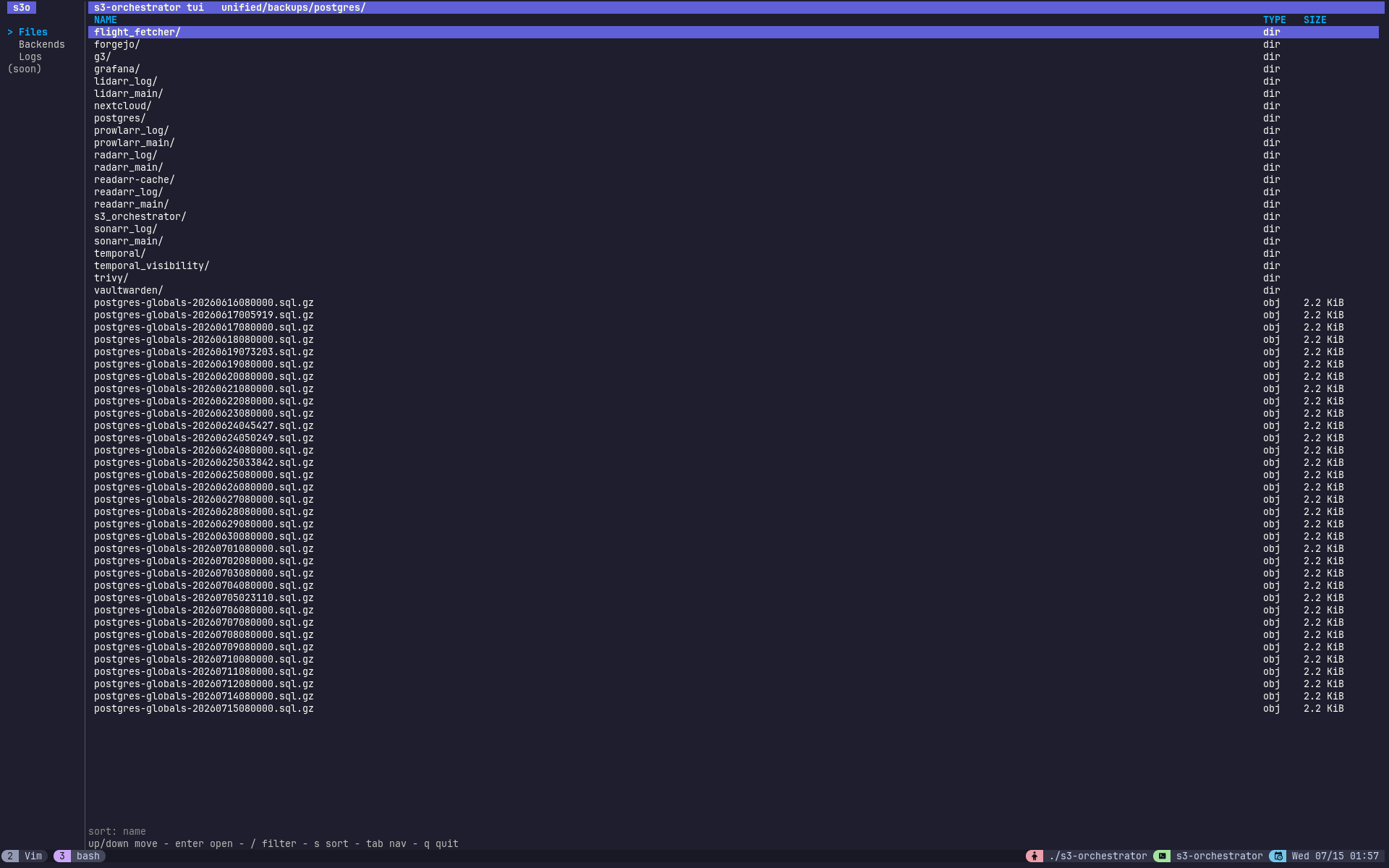
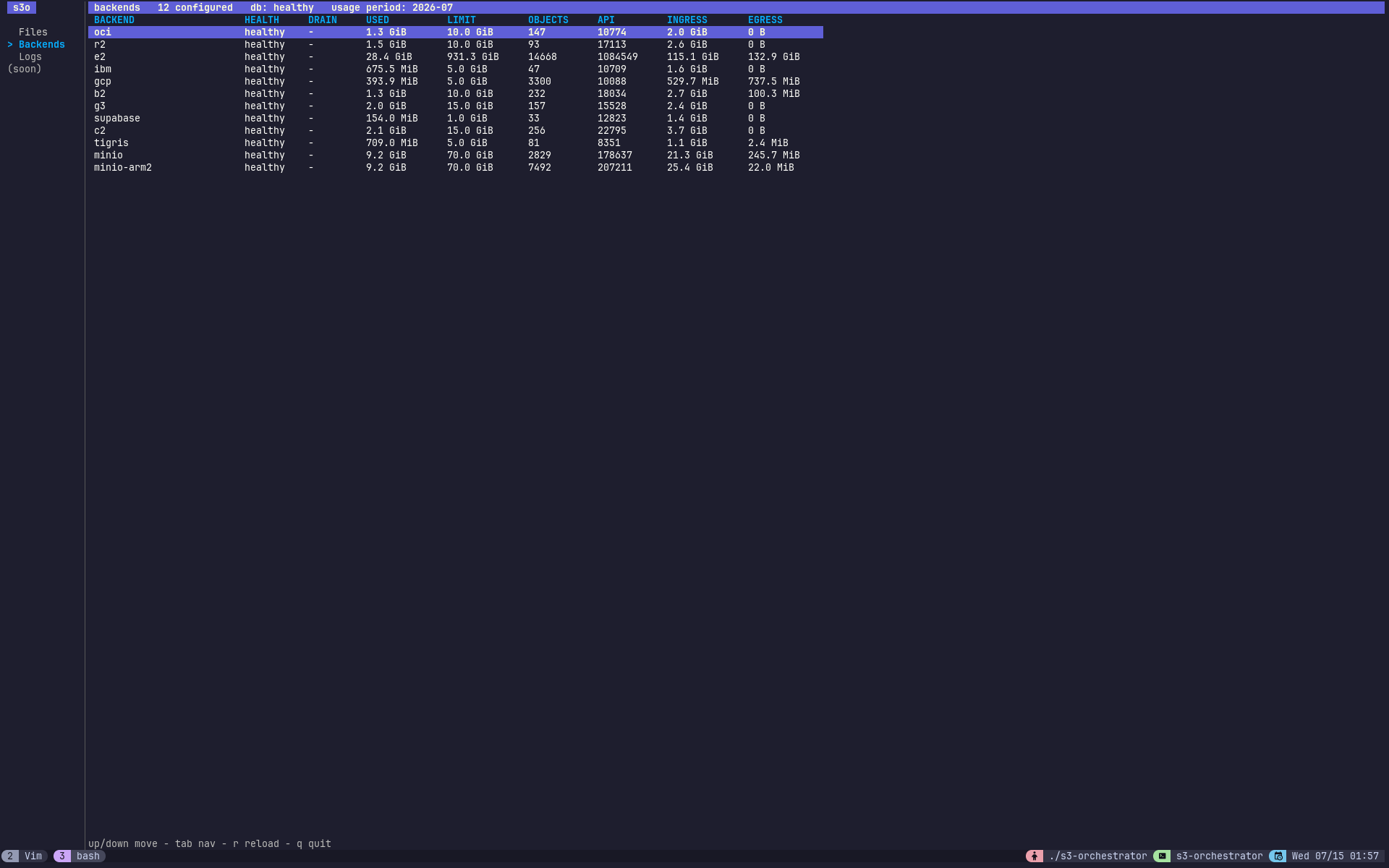
Full-screen, read-only terminal UI. Launches an interactive Bubble Tea app with a persistent left navigation bar: Files browses the object namespace one prefix at a time and, on any object, opens an inspector pane showing every backend copy; Backends shows the configured backends and their live status; Replication shows a self-refreshing view of replication health; Logs shows recent structured log entries. The pane with keyboard focus is shown with a bright title bar (the other is muted). Resolves the server address and admin token with the same precedence as admin (flag → environment → config file), loading config.yaml only when a value is still missing:
Flags:
| Flag | Default | Description |
|---|---|---|
-config | config.yaml | Path to config file; loaded only when -addr/-token (or their env vars) are unset |
-addr | $S3O_ADMIN_ADDR, else config server.listen_addr | Server address |
-token | $S3O_ADMIN_TOKEN, else config ui.admin_token / ui.admin_key | Admin API token |
Keys:
| Key | Action |
|---|---|
tab | Move focus between the sidebar and the content area |
f | Jump to the Files section |
b | Jump to the Backends section |
p | Jump to the Replication section |
l | Jump to the Logs section |
L | Cycle the Logs level filter (all / INFO / WARN / ERROR) |
R | Reconcile usage counters across all backends (asks to confirm) |
F | Flush the in-memory object cache (asks to confirm) |
y / n | Accept / cancel a pending action confirmation |
up / down | Move the selection (or the sidebar highlight when it has focus) |
enter / right / l | Open: a sidebar section, a prefix, or the inspector on an object |
backspace / left / h | Go up one prefix; from the inspector or Backends, return to where you were |
/ | Filter the current listing by substring |
s | Cycle the sort order (name / size) |
esc | Clear the filter; from the inspector or Backends, step back |
r | Reload the current view |
q / ctrl+c | Quit |
The listing pages lazily: scrolling past the bottom of a truncated prefix pulls the next page. Press / to filter the loaded rows by substring, and s to sort by name or size. Objects show their stored size in human-readable units alongside child prefixes.
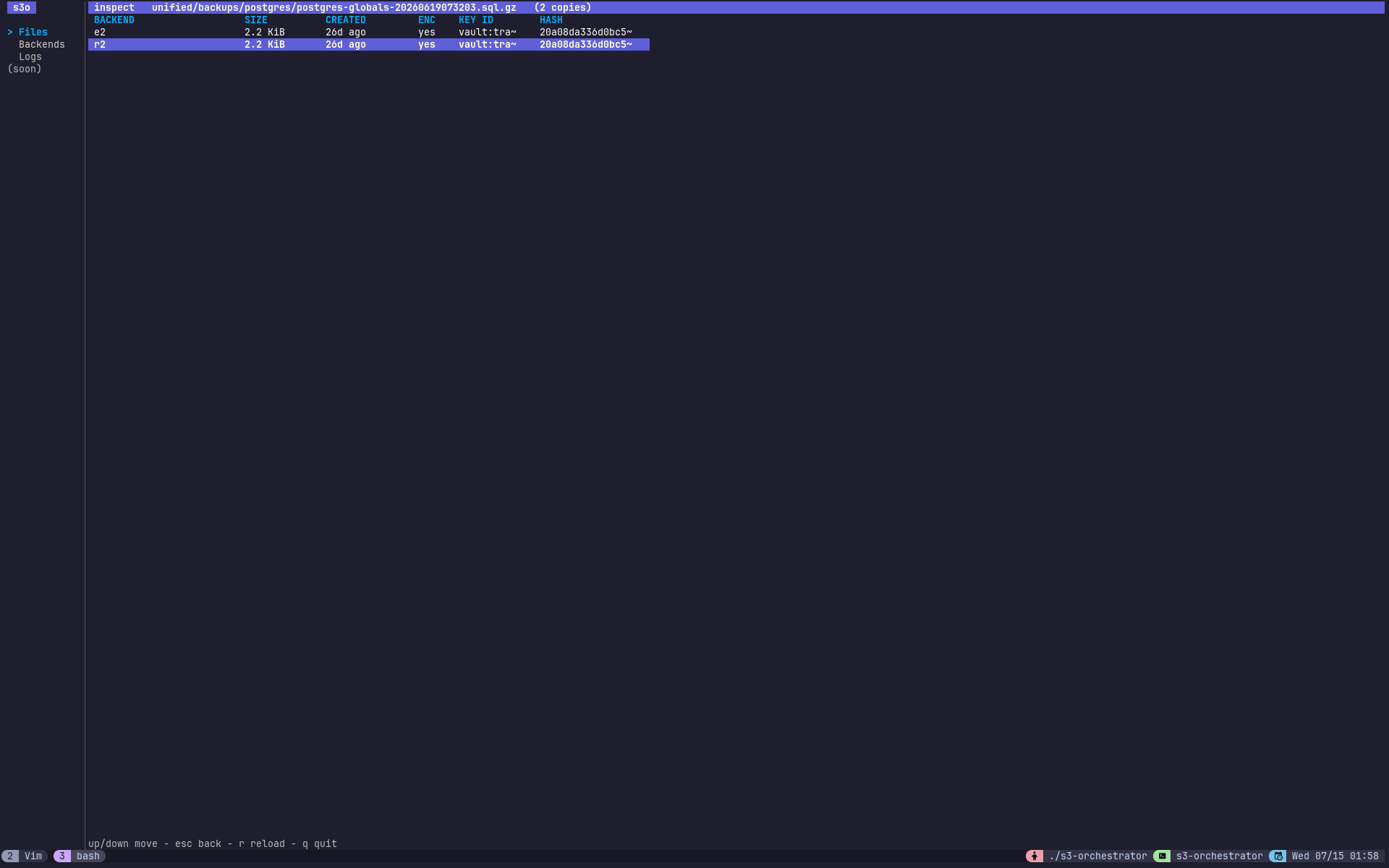
The inspector renders one row per backend copy - backend, size, age, whether the copy is encrypted, its key id, and a content-hash prefix - sourced from GET /admin/api/object-locations. It is the interactive equivalent of admin object-locations, and like the rest of the admin surface it never displays raw key material.
The Backends section is the interactive equivalent of admin status, sourced from GET /admin/api/status. It renders one row per configured backend - circuit-breaker health, drain state, quota used and limit, a USE% column (used / limit), object count, and the current period’s API request, ingress, and egress counters. A stats line under the title shows the metadata database health (green when healthy, red when not) and the total usage across backends (used / limit (pct%), coloured by fill). Press r to refresh the snapshot.
The metadata database health is also shown persistently at the bottom of the sidebar (db ok green / db DOWN red), fetched at startup so it is visible from every section.
The Replication section shows cluster-wide replication health, sourced from GET /admin/api/replication - the configured replication factor and the current under-replicated and over-replicated object counts, with the age of the underlying snapshot. It auto-refreshes every few seconds while it is the active section (the counts drift constantly as workers reconcile), so the view stays live without a keypress; the ticker stops once you leave. The pending counts are coloured amber when there is a backlog and green at zero. Press r to force an immediate refresh. Because the endpoint reads a snapshot the metrics collector already computes on its own interval, polling it is cheap.
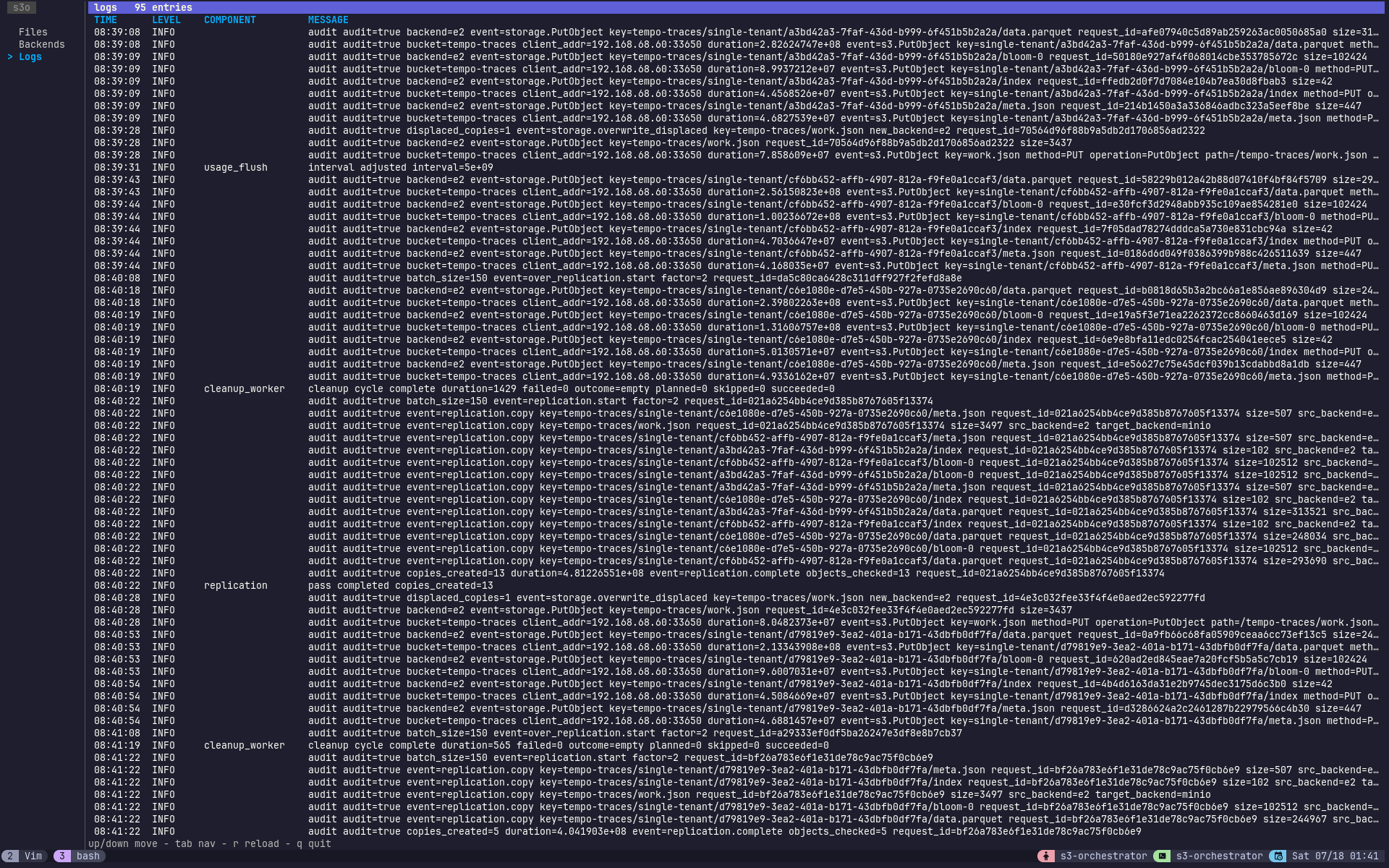
The Logs section shows recent structured log entries from the instance’s in-memory log buffer, sourced from GET /admin/api/logs - the same buffer the web dashboard’s logs pane reads. Each row is time, level, component, and a human-readable message with its structured attributes appended as key=value pairs (not raw JSON). The level is colour-coded by severity (WARN and ERROR stand out; INFO stays neutral). Press L to cycle the minimum-level filter (all / INFO / WARN / ERROR) and r to refresh.
Beyond browsing, the TUI can trigger a growing set of admin actions. Every write action shows a y/N confirmation in the footer before it runs, and its result (or error) is reported there afterwards. The instance-wide actions available from any section are R (reconcile usage counters) and F (flush the object cache); more will land over time.
Importing Existing Data
The sync subcommand imports objects from an existing backend bucket into the orchestrator’s metadata database. Use this when bringing a bucket that already has data under orchestrator management.
Dry run first
Always preview what would be imported before committing:
Run the import
The --bucket flag specifies which virtual bucket the imported objects belong to. Keys are stored internally as {bucket}/{key}, so this determines the namespace.
Partial import with –prefix
Import only objects under a specific key prefix:
Objects already tracked in the database for that backend are automatically skipped. The command logs per-page progress and a final summary.
Sync flags
| Flag | Default | Description |
|---|---|---|
--config | config.yaml | Path to configuration file |
--backend | (required) | Backend name to sync from |
--bucket | (required) | Virtual bucket name to assign to imported objects |
--prefix | "" | Only sync objects with this key prefix |
--dry-run | false | Preview without writing to the database |